Reading through our list of new features, you’ll probably think the team had a serious sugar overdose this Easter to produce so many wild updates… I myself thought that once we’d made your content interactive, we’d settle down. BUT NO, WE’RE TURNING UP THE VOLUME! We are paying tribute to all our partners who use Glowbl for their language courses—the French Alliance, AEFE, English4French, or Acadomia—for whom audio is an essential part of their teaching practice. I’ll also suggest a few ideas for using audio beyond languages.
What’s new and making noise !
🎧 🎧 New facilitation tool: set the atmosphere !
👆 🎶 Adding audio to content (PDF / Whiteboard)
📙 🔊 Importing audiobooks

[Side Note] Using audio in class

And much more!
🚪Holding participants in the lobby
🫸Non-anonymous polls
👣 Moving a participant to another table
🫧 Enlarge Content : viewing more participants
🎧 New facilitation tool: set the atmosphere !
Add background music, archives, interviews, podcasts, or readings independently of any other content. Create your own music or sound library that follows you across all your spaces! Please note, audio is launched per table (in “Independent Tables” mode).
⚙️ Access : Music note icon ♪ in the facilitation tools (on the right of your screen)
👆 🎶 Adding audio to content (PDF / Whieboard)
For your plenaries or breakout groups, you can link one or more audio files to your PDF slides and our Blank Pages (Whiteboards). Participants can trigger the audio themselves (if they have interaction rights) directly from the annotation tools.
⚙️ How to
1. Project a PDF or a Blank Page (Blue Plus > Document & Whiteboard)
2. Select a slide
3. Click on ♪ in the annotation tools
4. Import your audio files
5. 💾 Remember to save your document as a template (3 dots in the annotation tools > Save as Document Template)
It will be marked with a blue dot in your library (Blue Plus > Document & Whiteboard), ready to be reused with all your groups
📙 🔊 Importing audiobooks
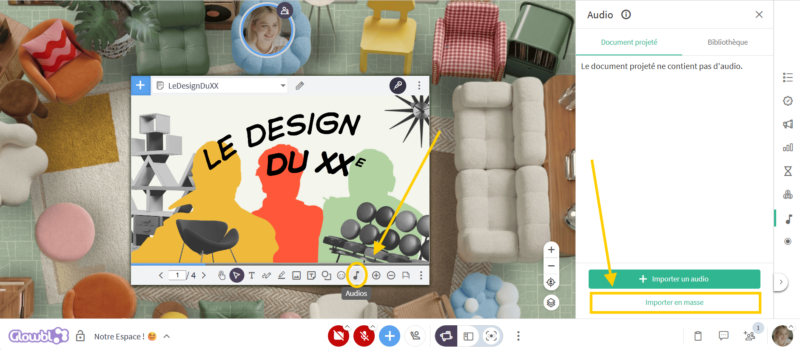
If your content includes a lot of audio files, you can import them all at once! No more screen sharing your audiobooks—import them directly into Glowbl. Play each audio clip yourself or finally give your participants control
⚙️ How to
1. Preparation :
a. Create a single-column list.csv file where the first row is a header. The following rows contain the audio filename and extension, followed by a comma and associated slide number (e.g., activityinstructions.mp3,9). No spaces allowed.
b. Zip all audio files together + this .csv file
2. Importing to Glowbl :
a. Import your PDF (Blue Plus > Document & Whiteboard > Import a File)
b. Annotation Tools > ♪icon > Bulk Import
C. Import the .zip file
d. Save as a template (3 dots in the annotation tools > Save a document template)
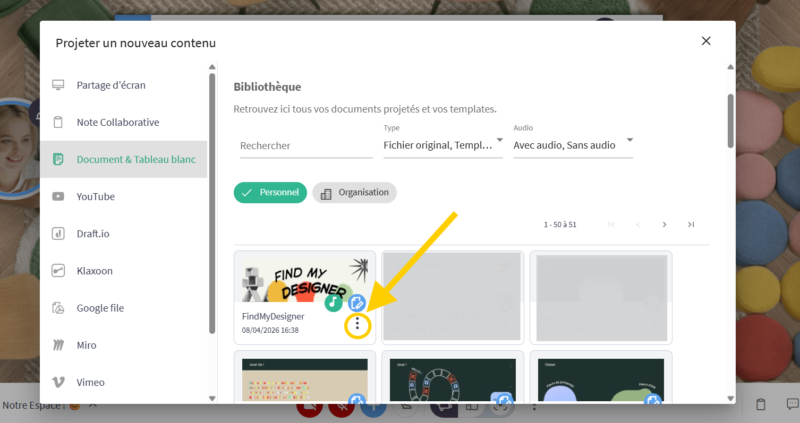
💡 Making audiobooks available to all your facilitators
Consider sharing resources to save your trainers time. Once saved, your audiobooks can be shared with your entire organization.
⚙️ How to
1. Open the library (Blue Plus > Document & Whiteboard)
2. Locate the book
3. Click the 3 dots > Access Rights Management
4. Tick “Publish within the organization“
🚨 Action reserved for Super Admins and Organization Managers
Without getting into the debate over learning styles, let’s simply think in terms of multimodality: our brains retain information better when it is engaged through multiple sensory channels. By varying your media, you strenghten your learners’ retention and understanding.
An invitation to play with sound…
Owing to a former life as a video editor, I love thinking about the relationship between sound, text, and image. In Drawing and Words, Japanese designer Bunpei Yorifuji talks about distance. Drawing an apple next to the word “apple” doesn’t create the same resonance, power, or emotion as that same word “apple” used as a caption for a drawing of a woman fallen from a chair, the bitten fruit rolling away on the floor.
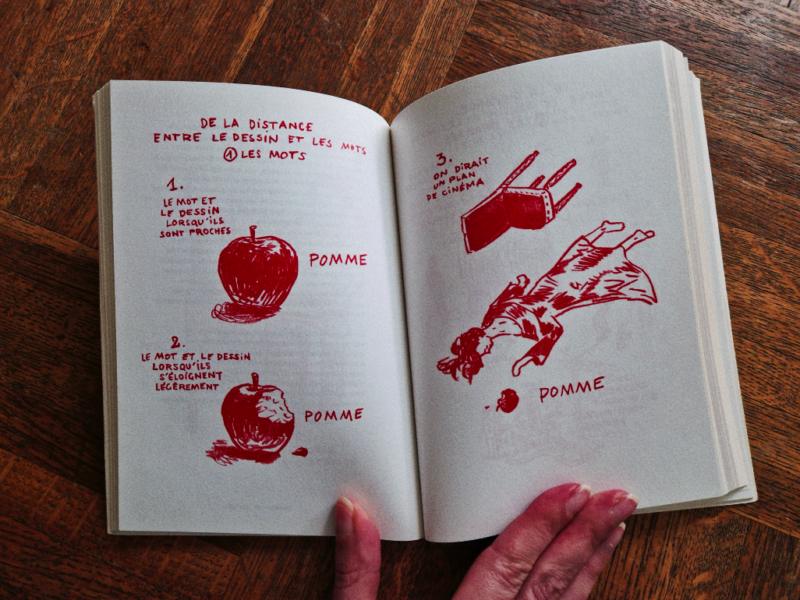
This gap between what is shown and what is said can cause an intellectual “jolt,” and through that jolt, leave a mark on your memory. In cinema, we call this counterpoint. An example is the “cheerful” pastoral music by Hanns Eisler set against the horrific images in Alain Resnais’ Night and Fog, which still haunts me.
It’s a concept theorised by Michel Chion as “anempathetic” music: music that displays total indifference to a dramatic situation on screen, forcing you not to remain indifferent.
Here is an invitation to consider the distance between the senses used in your training: :
- Literal Redundancy (The Echo): The sound says exactly what the image shows. This is effective for basic acquisition (languages, technical vocabulary). Be careful, however, not to saturate the information.
- Complementarity (The Puzzle): The audio provides what is missing from the image to form a complete message. Effective for building global understanding and contextualising.
- The Discrepancy (the counterpoint): There is a break between what is heard and what is seen. This is effective for engaging a learner and stimulating curiosity because the “bizarreness effect” captures more attention and is better encoded in the memory. Very useful for introducing or restarting a session, provided it doesn’t generate unnecessary confusion.
In practice, audio will help you to:
- Immerse : Set a sound or music atmosphere to set the scene (serious games, sound simulation of a work environment). Introduce a mission through a character’s voice and a soundscape.
- Guide : Humanise instructions by saying them word-for-word, explaining them, or translating them to clear up ambiguities.
- Enrich : Provide keys to interpretation (deciphering a graph), illustrate/contextualise through testimony (interviews, archives), or perfect a skill (pronunciation).
*💡Get inspired by RPGs; check out the incredible resource : Tabletopaudio !
On Glowbl, we identify facilitators with a badge on their bubble, but perhaps we should give you a pilot’s cap instead! Failing that, here are the controls to better manage access and movement in your spaces.
🚪Holding participants in the lobby
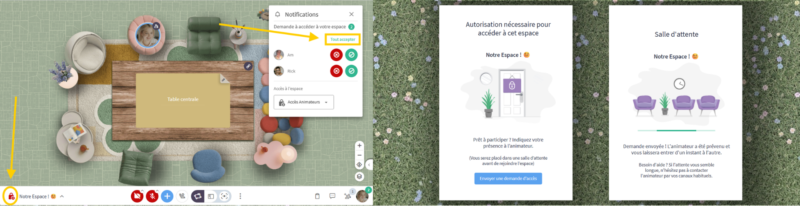
Welcoming your groups becomes more flexible thanks to three access levels:
- 🔓Public Access: anyone with the link to your space can enter whenever they wish.
- 🔒Restricted Access : Only authorised people (added to the Permanent Access list or via your LMS) can enter at any time. Others go to a waiting room, and you can grant or deny entry.
- 👨💼 Facilitator Access: Only Facilitators and Administrators can enter freely. Others wait in the waiting room for your validation.
This last level allows you to block entry while you prepare your session..
⚙️ You can change the access mode at any time by clicking the padlock icon 🔒 next to your space’s name OR via the Participants tab > Invite Participants.
We’ve also improved the waiting room messages and the notifications for entry requests: you can now admit all participants at once or change the access level directly from the notification itself.
💡 Pedagogical Note: Permanent, open spaces are the Glowbl signature. So, before you close your spaces, try out the magic of public access. Some English trainers at the AEFE discovered that their students were meeting 10 to 15 minutes before the lesson to revise together. Following this realisation, they adapted their approach to allow more room for co-learning, actually reducing their “live” teaching hours in favour of total learner autonomy!
🫸Non-anonymous polls
Facilitators can now see the identity of voters! Simply tick “Show voters’ names to hosts“ before launching the poll. This preference is then saved in the system.
Participants are notified that their response is visible only to facilitators: the results displayed on the table remain anonymous.
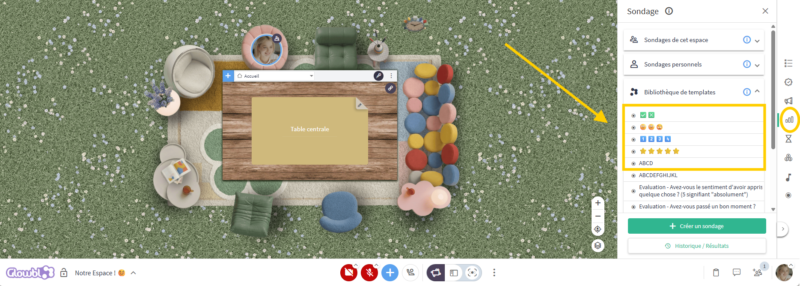
🎁 Bonus : 5 new quick and visual poll templates are here! Gauge your group’s mood 🙂 😐 😒; their opinion ⭐⭐⭐⭐⭐; or check their knowledge ✅ ❌…
👣 Moving a participant to another table
If you want to help a participant who is having trouble moving, or speak with them privately without disrupting the rest of the group, you can now automatically send them to the table of your choice!
⚙️ Two Access Point
1. On the participant’s bubble > small footsteps icon 👣
2. In the Participants pane > three dots next to the participant’s name > 👣 Change Table
💡 Pedagogical Note : This feature was designed to improve accessibility—be it digital, physical, or cognitive. However, remember that a great strength of Glowbl is making participants active in their learning. Continue to teach them to move by themselves to develop their autonomy.
🫧 Enlarge Content : viewing more participants
In Enlarge Content display mode, you have three bubble sizes. We have improved the “Small” display to show participants side-by-side rather than one below the other. This new layout allows you to see 8 to 10 participants at a glance.
⚙️ Access : Enlarge Content mode > three dots in the Speaking pane >“Size: Small”
How do you use audio, or do you plan to use it in your sessions? Do you welcome your participants with music? Have you started creating interactive activities with our annotation tools? Have you downloaded our new table layout?
Is it still the sugar talking? We have so many questions and are so eager for your feedback and creations! Be nice, give us a shout—we don’t bite.🦔
Have a great session on Glowbl!
I am Aude-Marine Bertin, and as a Digital Learning Manager, I will guide you through getting started with Glowbl. I host workshops twice a week and run dress rehearsals ahead of your live sessions. With a background as a film editor and festival coordinator, I look forward to helping you create inspired and creative events, workshops, and training sessions.. LinkedIn
