Virtual classroom: definition, benefits and how to run one
The virtual classroom has become the flagship format of distance training. But between a video call people simply endure and a genuine learning experience, the gap is enormous. Definition, comparisons, facilitation method and activity ideas: here is everything you need to design virtual classrooms that truly engage.
What is a virtual classroom?
A virtual classroom is a synchronous distance-training format that brings a trainer and a group of learners together, in real time, within an online space. Through audio, video, chat, breakout groups and collaborative tools, it recreates the interaction of a physical training room, wherever the participants happen to be.
Two characteristics fundamentally set the virtual classroom apart from other digital learning formats. First, it is synchronous: everyone is present at the same time, exchanges are live, questions get immediate answers and the group moves forward together. Second, it is interactive: the learner is not a spectator watching content scroll by, but someone who takes part, speaks up, handles materials and works with peers.
That is precisely what distinguishes it from an e-learning module (asynchronous and individual) or a webinar (synchronous but one-way). A successful virtual classroom rests on a simple principle: the learner should be active most of the time. You find the familiar patterns of the training room, transposed to digital: the round of introductions, breakout work, the whiteboard, the flipchart, sticky notes, plenary debriefs and even the coffee break.
What a virtual classroom is not
Let's be honest: a lecture delivered over a video call, with cameras off and microphones muted, is not a virtual classroom. It is content broadcasting. A genuine virtual classroom is measured by the space it gives the learner: speaking time, activities, collective output, feedback. If participants could just as easily watch a recording, the format has not delivered on its promise.
The virtual classroom is now recognised as a distance-learning format in its own right. It fits into professional development pathways, including certified ones, and combines very well with other formats in a blended learning approach: e-learning modules upfront for theory, virtual classrooms for practice and consolidation, and learning communities for ongoing support.
They run their virtual classrooms with Glowbl







The virtual classroom in figures
A format that has become unavoidable in corporate learning strategies
The virtual classroom ranks among the most widely used synchronous formats in distance training according to digital learning professionals (ISTF surveys).
The recommended interval between participant activities to keep attention alive throughout a remote session.
No journeys, no rooms to book, no accommodation costs: the virtual classroom dramatically reduces the logistical cost and carbon footprint of training.
Since 2020, distance training has changed status: once a fallback solution, it is now a structural component of skills development plans. Industry studies, such as ISTF's annual digital learning barometer, show that the question has shifted. It is no longer "should we run virtual classrooms?" but "how do we run them better?": improving facilitation quality is regularly cited as a priority by learning and development leaders. That is exactly what this guide is about.
Virtual classroom, webinar, video conferencing, e-learning: what's the difference?
Four digital formats that are often confused, four very different purposes
The confusion is widespread, even among professionals: as soon as a screen and a webcam are involved, everything becomes "a video call". Yet choosing the wrong format for the right objective is the number one cause of disappointment in distance training. A webinar will never build a skill, and a virtual classroom is overkill for a simple announcement. Here is how to tell them apart.
| Criterion | Virtual classroom | Webinar | Video conferencing | E-learning |
|---|---|---|---|---|
| Main objective | Train, get people practising | Inform, promote | Meet, decide | Transmit knowledge |
| Timing | Synchronous (real time) | Synchronous (real time) | Synchronous (real time) | Asynchronous (self-paced) |
| Participant's role | Contributor: produces, discusses, collaborates | Spectator: listens, asks questions in the chat | Interlocutor: takes part in the discussion | Consumer: works through content |
| Group size | 6 to 15 ideally, up to 300 with breakout groups | 50 to several thousand | 2 to 20 | Unlimited |
| Interaction | High: breakout groups, workshops, whiteboards, quizzes | Low: chat, occasional polls | Medium: conversation, screen sharing | None with other learners |
| Instructional design | Essential: timed run sheet, varied activities | Presentation outline | Agenda | Designed upfront (modules) |
| Tracking and audit trail | Yes: attendance, participation, evidence of learning | Audience statistics | None | Scores, completion rates |
| Best suited to | Skills development, workshops, peer coaching | Conferences, launches, mass awareness | Team meetings, project check-ins | Theory, compliance, prerequisites |
Comparison of the four main formats for distance training and communication
Virtual classroom vs webinar: the most common confusion
Remember this simple rule: the webinar informs, the virtual classroom trains. In a webinar, one or two speakers address a large, passive audience; interaction is limited to the chat and a few polls. In a virtual classroom, the group is small, everyone has a name, a face and a voice, and the trainer alternates short inputs with hands-on activities. The two formats complement each other: a webinar can launch a training programme, and virtual classrooms then form its pedagogical core.
Virtual classroom vs video conferencing: a matter of tooling and mindset
Zoom, Microsoft Teams and Google Meet are excellent meeting tools. But a meeting is not a training session. Video conferencing tools line up cameras in a grid and hand the floor to a presenter: they reproduce the logic of the meeting room, not the training room. What is missing is space — the tables where you sit down in a small group, the workshops you move between, the materials you handle together, the room that persists from one session to the next. That is what dedicated virtual classroom platforms bring, and we cover it in detail in the tool comparison.
The benefits of the virtual classroom (and the limitations to know about)
A powerful format, provided you master its conditions for success
Geographic reach
Train teams spread across multiple sites, countries or time zones without anyone travelling. Everyone joins the session from their desk or from home, with nothing more than an internet connection.
Lower costs
Travel, accommodation, catering, room hire: the logistics of face-to-face training disappear. The budget goes where it matters — the pedagogy and the trainers' time.
Flexible formats
Short, regular sessions replace full days blocked out in the diary. This sequencing supports long-term retention and fits far more easily into people's schedules.
Interaction and connection
Contrary to popular belief, a well-run virtual classroom creates real connection: peer exchange, breakout work, mutual support. It breaks the isolation of solo e-learning.
Scalability
A single run sheet can be delivered by dozens of trainers to thousands of employees, with consistent quality and centralised tracking data.
Audit trail and compliance
Attendance, participation, deliverables, assessments: everything can be tracked and stored — a decisive advantage for regulated training and quality requirements.
The limitations to plan for
The virtual classroom also has its watch-outs, and knowing them is the best way to neutralise them. Attention drift first: remotely, distractions are everywhere (email, notifications, open-plan noise). The antidote comes down to one number: an activity every 7 to 10 minutes. Video fatigue next: sessions that run too long or stay too passive are exhausting; you need to sequence, vary the formats and build in real breaks. Technical friction finally: every extra tool to open, every install to complete, every tab to juggle costs attention and confidence. Hence the importance of choosing an all-in-one platform, accessible in one click from the browser, where every activity happens in the same interface.
How to build a virtual classroom in 6 steps
A successful virtual classroom is 80% won before the session starts. Here is the full method, from setting objectives to post-session follow-up.
Define the learning objectives
What should participants be able to do by the end of the session? Identify the audience, their level and their constraints, then set no more than 2 or 3 operational objectives per session. This framing determines the format, the duration and the activities. A virtual classroom is not a catch-all: two short, focused sessions beat one marathon.
Design a minute-by-minute run sheet
Build a precise sequence alternating short inputs (10 minutes maximum) with activities: quizzes, brainstorming, breakout work, case studies, debriefs. Plan the welcome, the icebreaker, the transitions, the breaks and the close. With Glowbl, this run sheet is pre-programmed inside the room: on the day, activities launch in one click and the trainer can focus on facilitation rather than logistics.
Prepare the room and the materials
Load your materials into the training space in advance: slimmed-down decks (20 slides beat 200), pre-filled whiteboards, worksheets, videos. With a persistent room, everything is ready before the session and everything stays available afterwards: participants find their own output again from one session to the next.
Invite and onboard participants
Send a clear invitation: objectives, agenda, duration, single joining link, technical prerequisites. Open the room early so everyone can test their microphone and camera, explore the space and get acquainted. Schedule an automatic reminder one hour before the session — the best remedy against no-shows.
Facilitate by making participants active
Start with a round of introductions or an icebreaker, set the ground rules (cameras on, active participation), then run your sequence while varying the pace. Watch for weak signals, draw in the quieter voices, acknowledge contributions. We cover the full facilitation method in the next section.
Assess, capture and extend
Close with a summary of the key points and an immediate evaluation. Leave resources and outputs accessible in the room. Then review the indicators: attendance, participation, quiz results, satisfaction. And keep the momentum going: training does not stop when the session ends, especially if the room stays open for the learning community.
How to choose your virtual classroom platform
Video conferencing tool or dedicated platform: what really changes for your training
Many organisations start running virtual classrooms on the meeting tool already deployed internally: Teams, Zoom or Meet. That is understandable, but these tools were designed for meetings, not for teaching. Seven criteria let you assess a solution objectively before rolling out training at scale.
| Selection criterion | Video conferencing tool (Zoom, Teams, Meet) |
Virtual classroom platform (Glowbl) |
|---|---|---|
| Spatial experience | A grid of aligned cameras, meeting-room logic | ✓ A visual room with tables: participants move around and gather, just as they would in person |
| Breakout groups | Closed breakout rooms, hard to supervise | ✓ Tables visible at a glance: the trainer moves freely between groups |
| Instructional design | None: the trainer improvises and juggles external tools | ✓ Pre-programmed run sheets: activities, materials and timings ready in advance |
| Built-in activities | Limited, require third-party tools (quizzes, whiteboards…) | ✓ Whiteboards, polls, quizzes, document and video sharing in the same interface |
| Room persistence | The meeting disappears when the call ends | ✓ Room open 24/7: materials, outputs and history stay available between sessions |
| Participant access | Install or account sometimes required depending on the setup | ✓ One click from the browser, with no install and no account for guests |
| Evidence of learning | Raw video recording | ✓ Stored outputs, attendance, shareable replay, participation indicators |
Functional comparison between general-purpose meeting tools and a dedicated training platform
The additional criteria not to overlook
Beyond teaching features, three criteria weigh heavily in an enterprise rollout. Data sovereignty and security: favour a GDPR-compliant solution hosted in France or Europe, particularly if you are a public body or a large group. Ease of access: every install required and every account to create is a barrier that costs you participants. Support: the success of a rollout depends as much on upskilling your trainers (hands-on workshops, tutorials, dry runs) as on the tool itself.
How to run an engaging virtual classroom
The three pillars of successful remote facilitation, from trainer-as-lecturer to trainer-as-facilitator
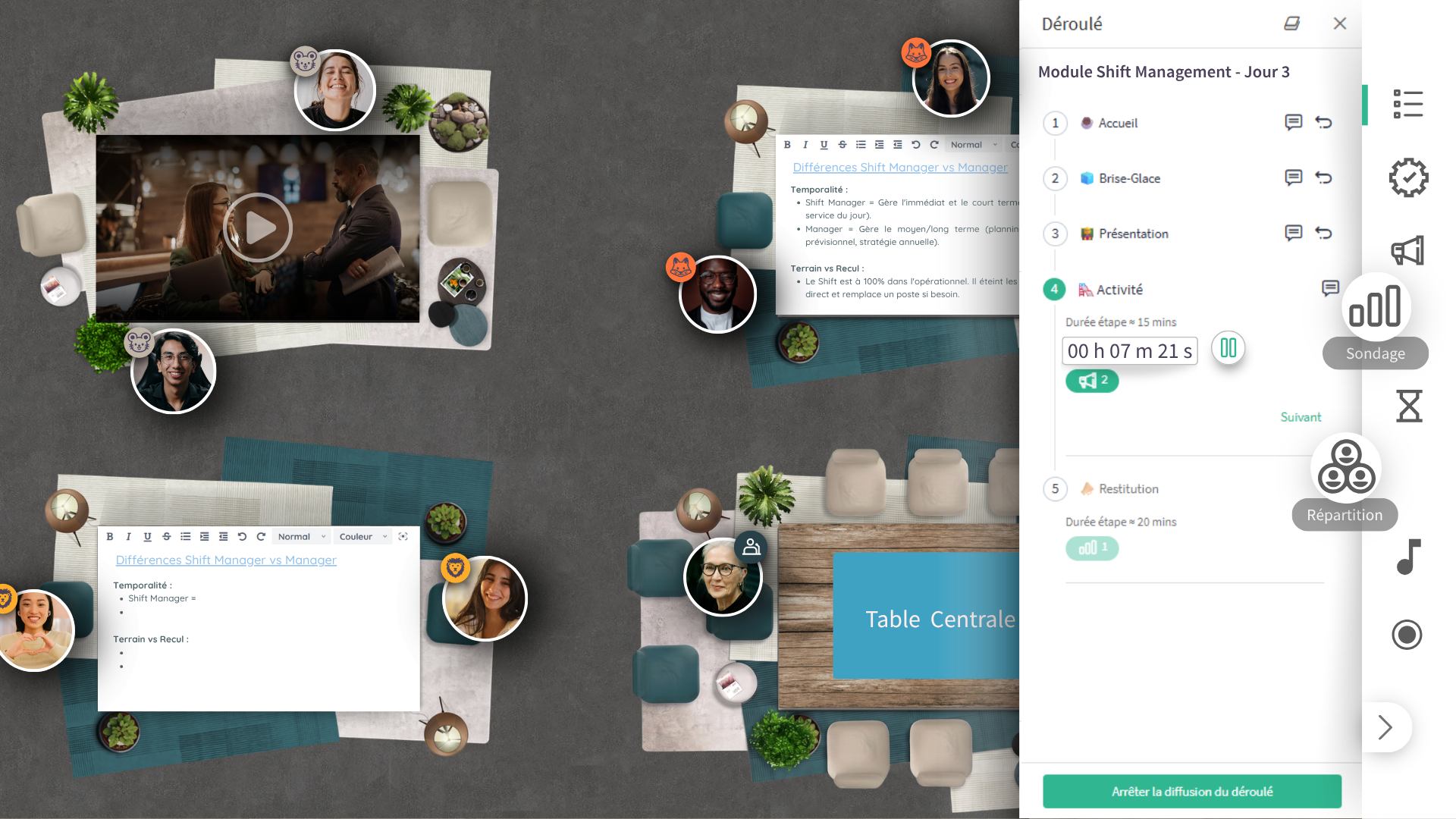
Pillar 1: recreate space and movement
In a physical room, people move around, turn to their neighbour, gather at tables, chat during the break. That freedom of movement drives engagement — and the camera grid made it disappear.
- Work tables participants join in a single click
- Smooth switching between plenary and breakout groups
- A visual, spatial dimension that humanises the relationship
- Informal moments: welcome coffee, breaks, networking
Pillar 2: vary the teaching methods
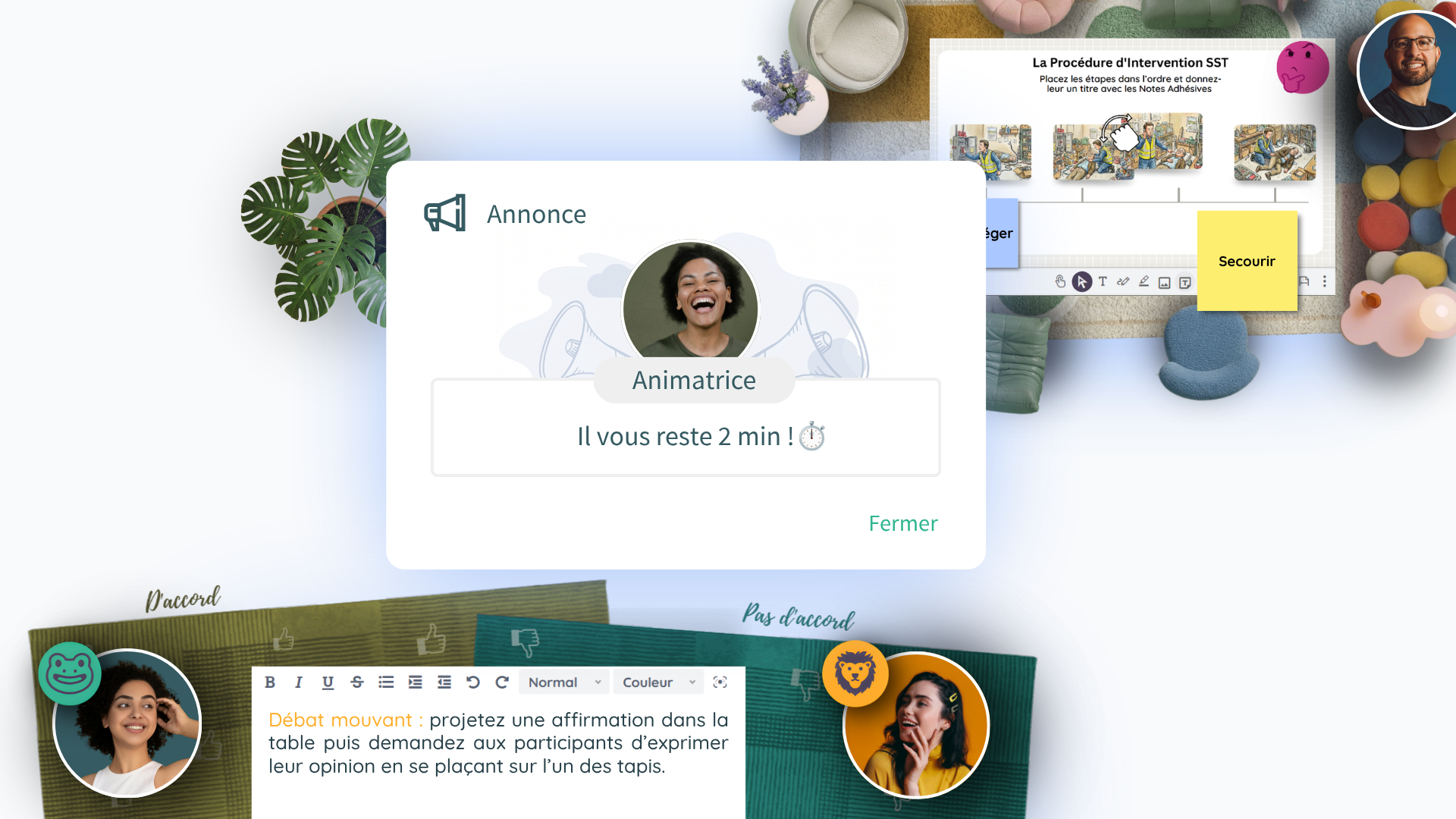
Remote attention is won through pace. The golden rule: no input runs longer than 10 minutes without being followed by an activity. To hold that rhythm without friction, everything has to be available without leaving the interface.
- Polls and quizzes to check understanding live
- Collaborative whiteboards to produce together
- Document, slide and synchronised video sharing
- Breakout workshops followed by plenary debriefs
- Less technical friction = more focus on learning
Pillar 3: make training last over time
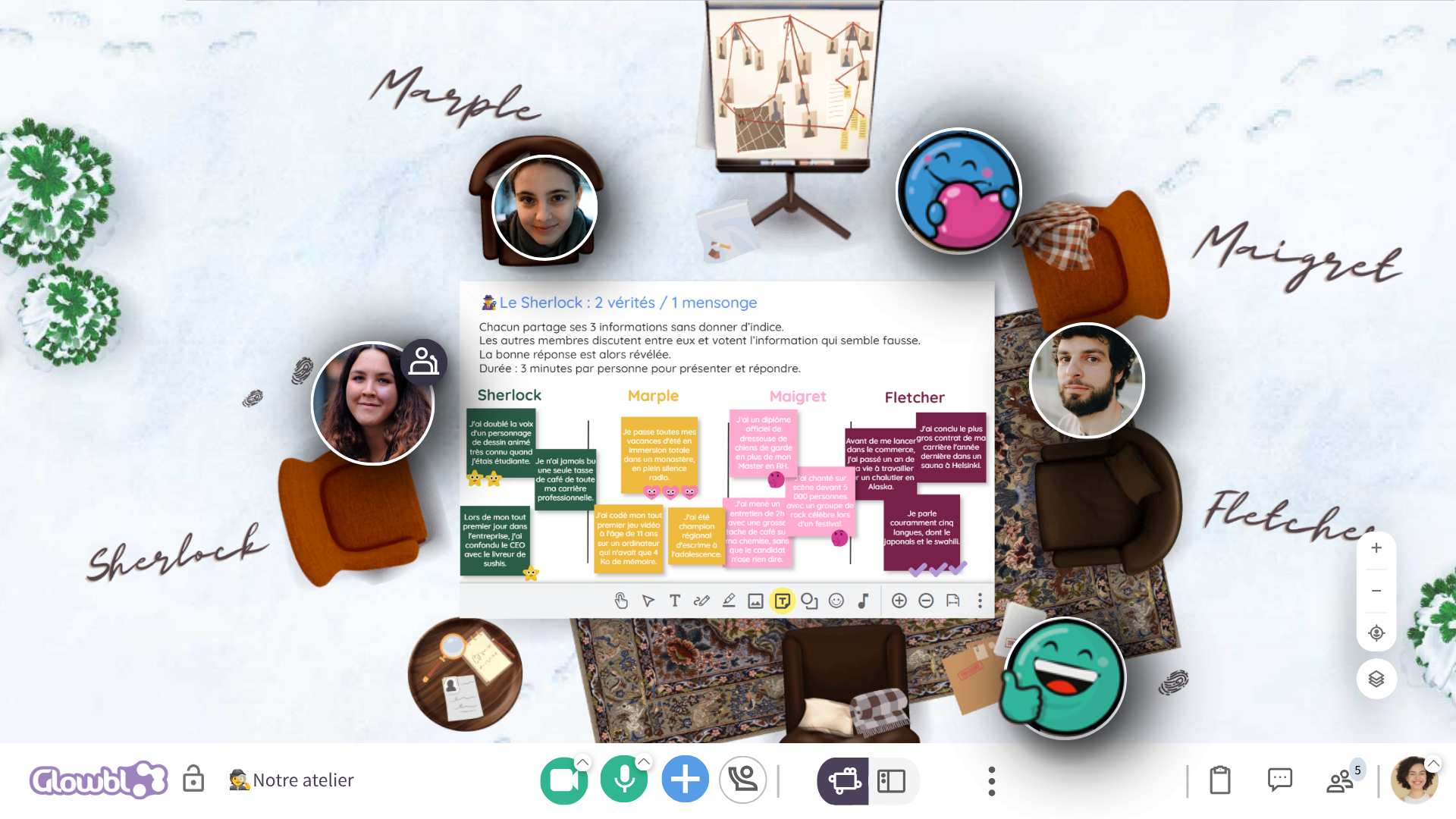
Training does not end when the video call does. A persistent room is the keystone of longer programmes: a sense of belonging to the group is a decisive factor in motivation and completion.
- The trainer prepares materials in the room in advance
- Learners test their access and get acquainted beforehand
- Outputs and resources stay available between sessions
- The replay lets absentees catch up on the session
- The learning community lives on between live sessions
The trainer's mindset: from lecturer to facilitator
The biggest change is not technological, it is postural. In a virtual classroom, the effective trainer talks less and gets people doing more. They go from 200 slides to 20, tie every concept to lived situations, share out the speaking time, observe group dynamics and steer accordingly. This facilitator mindset can be learned: hands-on workshops, dry runs, co-facilitating the first few sessions and pre-programmed run sheets that take the logistics off the trainer's plate are the fastest routes to that shift.
10 activities to energise your virtual classrooms
Proven formats to draw on when building your run sheets
1. The opening icebreaker
Weather check-in, photo prompts, "two truths and a lie": five minutes to get everyone talking from the start and establish participation as the norm.
2. The benchmarking quiz
At the start of the session to gauge the level and adjust the pace; at the end to validate learning and lock in the key messages.
3. Whiteboard brainstorming
Everyone posts ideas simultaneously on a collaborative whiteboard, then the group clusters, prioritises and votes. Guaranteed output in 15 minutes.
4. The breakout workshop
The heart of the virtual classroom: 3 to 5 participants per table, a clear brief, a deliverable, a time limit, then a plenary debrief.
5. The case study
A real situation from the business, analysed in a small group: nothing connects theory to day-to-day reality more effectively.
6. The role play
Client interview, managerial feedback, negotiation: two participants act out the scene at a table, the others observe against a grid, then everyone debriefs.
7. The one-minute poll
A flash question every 10 minutes to set the rhythm, take the temperature of the room and build on the results live.
8. The virtual world café
Participants rotate from table to table: each table tackles one question, a host captures the discussion, and collective intelligence circulates.
9. Peer coaching (co-development)
One participant presents a real problem, the group questions and then suggests solutions — a powerful format for manager communities.
10. The collective wrap-up
At the end of the session, each participant shares their key takeaway and their next concrete step: consolidation starts with putting it into words.
The virtual classroom at work: what is it used for?
Up to 300 people per space, with the option to link spaces together for large events
Large-scale internal training
Roll out consistent programmes delivered by several trainers or subject-matter experts, with the same run sheets and the same quality for every employee.
Onboarding new joiners
Speed up integration with immersive, participative sessions where new recruits start building relationships from day one.
Communities of practice
Sustain your networks of managers, experts or internal champions with persistent spaces where the community lives on between sessions.
Collective intelligence workshops
Awareness raising, innovation, transformation, problem solving, co-creation: get your teams working together, not just sitting in the same call.
Multi-site conferences
Build cohesion and alignment despite the distance, bringing several hundred employees together across linked spaces.
Team rituals
Collaborative meetings, retrospectives, sharing and coordination workshops: set up recurring moments that build connection.
What organisations say after making the switch
Large organisations that have transformed their virtual classrooms with Glowbl
"With Glowbl, we went from 138 slides down to 20 on our hygiene training module."
"Glowbl is the solution that comes closest to face-to-face training when you're running sessions remotely."
"When you use Glowbl, something happens. There's life in the room. Participants play with their bubble, move around, interact. I wasn't expecting them to enjoy it that much."
Your questions about virtual classrooms
What is a virtual classroom, in one sentence?
What is the difference between a virtual classroom and a webinar?
How many participants make for an effective virtual classroom?
How long should a virtual classroom last?
What equipment do participants need?
How do you stop participants from disengaging?
Is the virtual classroom compatible with quality standards and training funding?
Can you combine virtual classrooms and e-learning?
Ready to run virtual classrooms that genuinely engage?
Join Capgemini, Orange, Burger King, TotalEnergies and other major organisations who train their teams with Glowbl. Discover the platform in a personalised 30-minute demo with our experts.