
Earthquake alert on Glowbl with the arrival of version 5.8! 🌋 You think we’re playing Drama Queen? I don’t think so, because we’re releasing THE feature everyone’s been waiting for…
And I’m not even going to tell you what it is 😌 It was in the title…
On the menu of new functionalities:
- 🏐 Create teams and distribute them automatically !
- 🫧 Put participants’ bubbles in Picture in Picture
- 📄 Export session summary
And much more!

🏐 Create teams and distribute them automatically!
A new animation (and gamification!) tool appears in your right-hand sidebar, just below the timer: team creation.
You can now randomly generate up to 9 teams. The tool gives you the power to:
- Adjust team composition;
- Choose whether or not to include facilitators in the breakdown;
- Assign or not a dedicated table to each team;
- Automatically allocate all participants to tables with a single click!
A visual identity to find your way around
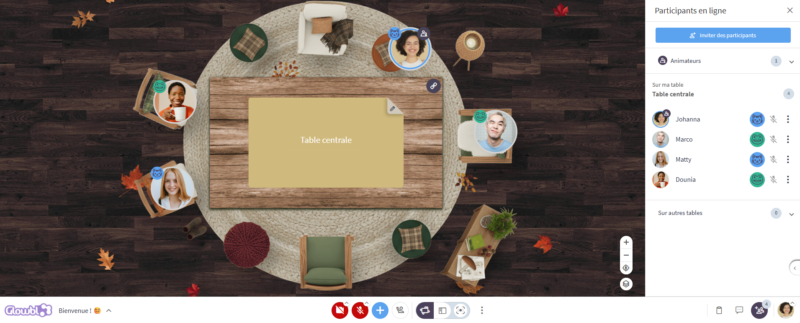
For immediate identification, each team is given a name and an icon (an animal + a color). This identity is visible both on participants’ bubbles, in the Participants tab, and on the table associated with the group.
Flexibility first and foremost
Assignment is not a prison! Participants remain free to move to other tables. This opens up new pedagogical possibilities:
- Facilitate feedback: When returning to the main table, you can keep the team display. It’s perfect for spotting which group each speaker belongs to, for example during a Collaborative Quiz.
- Mix up the members: “Now, each group must be made up of two mice 🐭 and two frogs 🐸!”
And if you’re taking a break, you can easily find and re-launch your previous team configurations in the history:
Our vision: a balance between automation and autonomy
As you may have noticed, we chose the term “Team” rather than “Group”. After some debate, this word came to the fore because it instills a dynamism and ebullience that we wish to encourage. We hope it will inspire you to develop your own serious (or less serious) games!
💡 Pedagogical note: While this feature is unspeakably practical, we’d like to remind you that one of Glowbl’s great strengths is to turn your participants into actors of their learning. So keep teaching them to move around on their own. Encouraging participants to make the space their own develops their autonomy and their desire to find their way around. And we’re not going to to teach you this: we’re always more productive and attentive in a space where we feel good.
🫧 Put participants’ bubbles in Picture in Picture
In Enlarge Content display mode, you can now detach video bubbles and place them, for example, on another screen. Practical for maintaining eye contact without sharing your screen blindly! The same applies when you’re in Synchronized Tables animation mode. So if you’re running teams on different tables and choose to share your screen with all of them, you’ll know which team member is asking you a question.
⚙️ Switch to Enlarge content display mode ➜ click on the 3 dots at the top of the bubbles pane (Manage bubbles view) ➜ Open in a new window

Works the same way in Synchronized Tables animation mode. / And it keeps team information! 🐸
📄 Export session summary
Each time a sequence is launched or stopped, a PDF summary sheet is automatically generated. It has been designed to be a strategic asset for your quality initiatives, as this document centralizes all the essential information for your audits (Qualiopi, AFNOR, ISO, funders…) and directly responds to several criteria of the national quality referential :
- Content traceability (Criterion 1): The PDF traces the content, objectives and flow of each session: this proves that the information communicated to learners is consistent with actual implementation.
- Evidence of design (Criterion 2): This details the teaching scenario (objectives, steps, instructions), showing that the training is structured, scripted and adapted to the objectives in question.
- Analysis and adaptation (Criteria 3 & 6): Allows you to analyze any discrepancies (actual vs. planned durations) and provides a basis for continuous improvement.
What else does this summary contain? Date, times, durations, names of facilitators, number of participants, name of space… As well as the list of documents projected during the session, the table or team concerned, and the associated link (video, whiteboard, external application…).
⚙️ In the animation tools, click on Unrolled ➜ History / Report ➜ select a Report ➜ Resources tab ➜ Download “Summary sheet”
And much more!
🎤 Mute all microphones at once
You can now mute all microphones at once (except your own) to avoid background noise. The feature works in all facilitation modes: Independent Tables and Synchronised Tables.
⚙️ Open the Participants tab at the bottom right of your screen, then click on “Mute all“.
❌ Exclude a participant from the space
When access to your space is private, it is now permitted to withdraw access from an inadvertently accepted or disruptive participant. 🤭
⚙️Open the Participants tab ➜ click on the three dots of the person to be ejected ➜ click on Remove access.
🖼️ Better identify Profile menu features
Your photo, located at the bottom right of the space, gives access to several functionalities: profile and preferences modification, access to the dashboard, tutorials, Glowbl Assistant and updates features… To better indicate that this photo is clickable, a small chevron (identical to those of the camera and microphone buttons) has been added. The entire tab has also been streamlined to make it easier to read.
🫂 Appoint facilitators when creating a new space
The Create a space button at the bottom right of the dashboard is now easy to spot thanks to its new blue color. We’ve also simplified the creation of a space by reducing the number of steps involved. And best of all: when you make your first entry, the “Invite participants and appoint facilitators” window opens automatically. You’ll remember to add your moderators at the right time… and you’ll save time!
Finally, we’d like to share a little of our “team spirit” with you:

Je suis Aude-Marine Bertin et en tant que Digital Learning Manager je vous accompagne à la prise en main de Glowbl lors d’ateliers dispensés deux fois par semaine et de filages en amont de vos sessions. Anciennement monteuse vidéo et coordinatrice de festivals, il me tarde de vous aider à organiser des événements, ateliers, et formations inspirés et créatifs. LinkedIn
